 Online Help
       Publishing Version |
|
Online Help Publishing Version |
XREF: Highlighting Contacts in Main MediaXREF is a convenient way to check the contacts in your project list against contacts in the Main Media Database. This feature will highlight in the Main Media Data those media records that are in your project list allowing you to quickly see if you left anyone off your list. To use this feature, select the Main Media Database tab and select the search button located on the Publicity Assistant tool bar. The search engine window will appear. Choose your search criteria and press the search button. Next click on the tab (i.e. Review List, Promotional Tour, Special Project) in which your project resides. Open your project and select the tools tab. Press the button entitled “XREF: Highlighting Contacts in the Main Media”. The Main Media Database window will come forward. The media records that are in your list will be highlighted in green.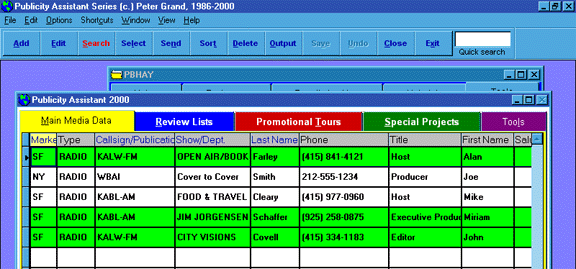 At this point, you may select the media contacts that are missing and send
them to your list. To exit out of the XREF feature, close your project list.
For more information, see:
Adding a Group of Contacts to a Promotional Tour
Adding a Group of Reviewers to a Project List
At this point, you may select the media contacts that are missing and send
them to your list. To exit out of the XREF feature, close your project list.
For more information, see:
Adding a Group of Contacts to a Promotional Tour
Adding a Group of Reviewers to a Project List
|